Authorization
All API requests require specific headers for authentication and identification. This page explains how to properly authorize your requests.
Headers
| Header | Description | Example | Required |
|---|---|---|---|
| App-Name | Identifier for your application. Use kebab-case format. | acme-inc | yes |
| App-Version | Version string for your application. Helps identify request sources. | 23.5.5 | no |
| App-Platform | Client platform. Accepted values are desktop, mobile, and browser. | browser | no |
| User-Agent | User agent string identifying your application. | AgentName/1.0.0 | no |
App-Name Format
The App-Name header must use kebab-case format.
Examples:
-
acme-inc -
my-wallet-app -
defi-platform -
Acme Inc(contains spaces) -
acme_inc(uses underscores) -
acmeInc(camelCase)
Important: While you don’t need to register your App-Name before using it, please let us
know which one you’re using before going live in production. This helps us monitor and support
your integration.
Forwarded Header (Server-Side Requests)
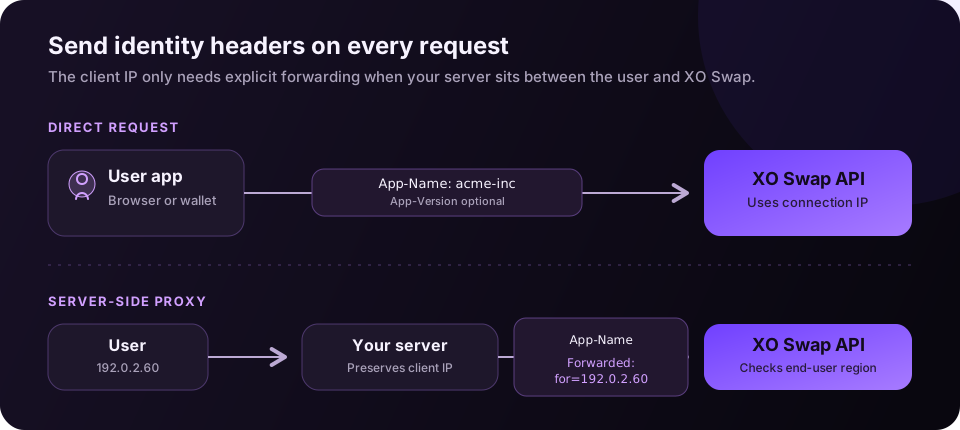
If you’re making requests from a server (proxy), you must include the Forwarded header with the original client’s IP address. This is used for geolocation availability purposes.
Note: Requests to the /assets endpoints do not require the Forwarded header.
The Forwarded header ensures that swap availability is correctly determined based on the end
user’s location, not your server’s location.
Example Request
Here’s a complete example showing all headers:
const response = await fetch('https://exchange.exodus.io/v3/pairs/BTC_ETH/rates', {
  headers: {
    'App-Name': 'acme-inc',
    'App-Version': '23.5.5', // Optional
    'App-Platform': 'browser', // Optional: desktop, mobile, or browser
    // Only required if proxying requests from a server
    Forwarded: 'for=192.0.2.60', // Original client IP
  },
});
Best Practices
- Consistent App-Name: Use the same
App-Nameacross all environments (development, staging, production) - Version Tracking: Use
App-Versionto track different versions of your application (optional) - Platform Identification: Send
App-Platformwhen the integration targets desktop, mobile, or browser clients (optional) - IP Forwarding: Always forward client IPs when proxying requests from a server
- Error Handling: If you receive authentication errors, verify the required
App-Nameheader is present and correctly formatted
Troubleshooting
Error: Missing required headers
- Ensure
App-Nameis present in all requests - Verify header names are spelled correctly (case-sensitive)
Error: Invalid App-Name format
- Check that
App-Nameuses kebab-case (lowercase with hyphens) - Remove spaces, underscores, and uppercase letters
Swap availability issues
- If swaps aren’t available for certain regions, ensure the
Forwardedheader is set correctly when proxying from a server - Verify the client’s IP address is being forwarded accurately