Get Order
GET/v4/orders/:idDescription
Retrieve information about a specific order by its ID. Use this endpoint to check the status of an order and monitor its progress.
Header Parameters
| Name | Description | Required | Example |
|---|---|---|---|
| App-Name | App-Name for the authorization | yes | acme-inc |
| App-Version | App-Version for the authorization | no | 23.5.5 |
| App-Platform | Client platform: desktop, mobile, or browser | no | browser |
| Forwarded | If you are proxying requests to the API, you must include the "Forwarded" header with the original request IP address. This is used for geolocation availability purposes. | no | |
| User-Agent | User-Agent for the authorization | no | AgentName/1.0.0 |
Path Parameters
| Name | Description | Required |
|---|---|---|
| id | Order ID from POST /v4/orders | yes |
Response
Order status
{
  "id": "order_xyz789abc",
  "status": "complete",
  "pair": "eip155:1/slip44:60_eip155:137/erc20:0x2791Bca1f2de4661ED88A30C99A7a9449Aa84174",
  "fromAsset": "eip155:1/slip44:60",
  "toAsset": "eip155:137/erc20:0x2791Bca1f2de4661ED88A30C99A7a9449Aa84174",
  "fromAmount": "1",
  "toAmount": "2500",
  "fromAddress": "0x742d35Cc6634C0532925a3b844Bc9e7595f0bEb",
  "toAddress": "0x531a9aA0f2cF0F0B193d6Ca6aA9d990a54A2657a",
  "slippage": 0.5,
  "createdAt": "2024-01-15T10:00:00Z",
  "updatedAt": "2024-01-15T10:05:00Z"
}
Response fields:
id- Order identifierstatus- Order status (see Order statuses below)pair- Pair identifier in CAIP-19 formatfromAsset- Source asset identifier in CAIP-19 formattoAsset- Destination asset identifier in CAIP-19 formatfromAmount- Amount sent in standard unitstoAmount- Amount received in standard unitsfromAddress- Source addresstoAddress- Destination addressslippage- Slippage tolerance percentagecreatedAt- ISO 8601 timestamp when order was createdupdatedAt- ISO 8601 timestamp when order was last updated
Order statuses:
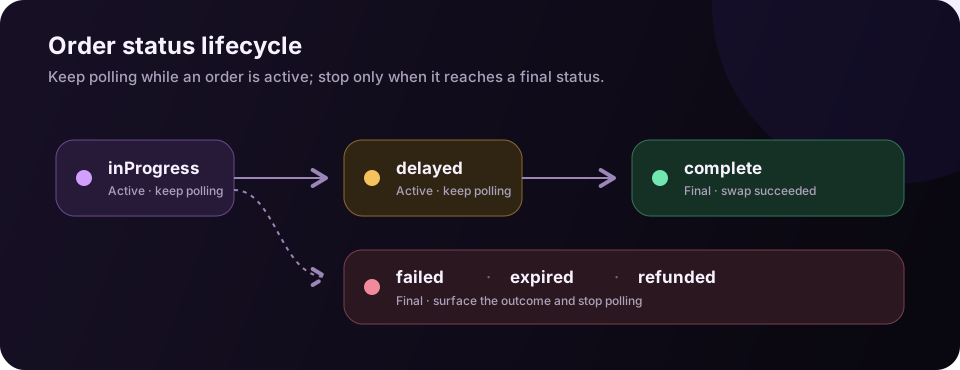
inProgress- The order is still being processedcomplete- The order was successfully processedfailed- The order failed to be processed (only reported while no deposit is confirmed)expired- The order expired (only reported while no deposit is confirmed)refunded- The order was refundeddelayed- The order is delayed
Once a deposit transaction has at least one confirmation, the order stays inProgress until it reaches a definitive status, even if the provider reports it as failed or expired first.
Last updated on