V4 Integration Flow
This guide walks you through integrating the V4 API to perform swaps
Prerequisites
- Set up the proper authorization headers
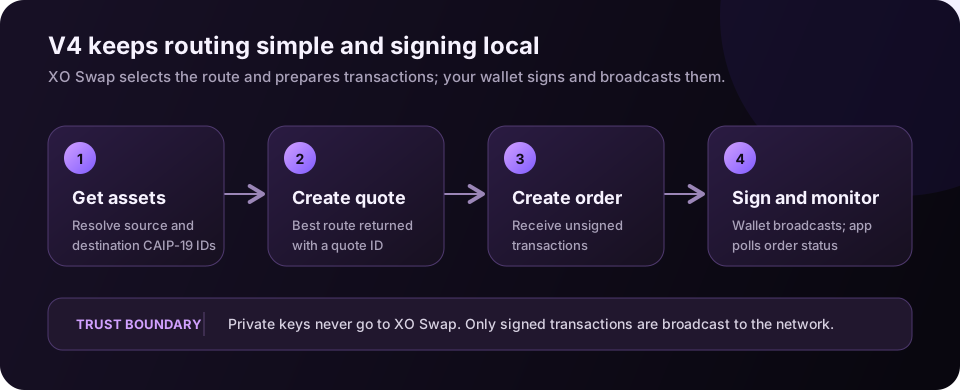
Step-by-Step Integration
Step 1: Get Assets
Get asset identifiers using GET /v4/assets. You’ll need the CAIP-19 identifiers for both source and destination assets.
Example:
// Get all assets
const response = await fetch('https://exchange.exodus.io/v4/assets', {
  headers: { 'App-Name': 'my-app' },
});
const { data } = await response.json();

// Find ETH and USDC on Ethereum
const eth = data.find((a) => a.symbol === 'ETH' && a.id.includes('slip44:60'));
const usdc = data.find(
  (a) => a.symbol === 'USDC' && a.network === 'eip155:1' && a.id.includes('erc20')
);

// Construct pair ID: {fromAssetId}_{toAssetId}
const pairId = `${eth.id}_${usdc.id}`;
// Result: eip155:1/slip44:60_eip155:1/erc20:0xA0b86991c6218b36c1d19D4a2e9Eb0cE3606eB48
Step 2: Create Quote
Create a quote using POST /v4/quotes. The API automatically finds the best rate by combining multiple providers.
Example:
const quoteResponse = await fetch('https://exchange.exodus.io/v4/quotes', {
  method: 'POST',
  headers: {
    'App-Name': 'my-app',
    'Content-Type': 'application/json',
  },
  body: JSON.stringify({
    pairId: 'eip155:1/slip44:60_eip155:1/erc20:0xA0b86991c6218b36c1d19D4a2e9Eb0cE3606eB48',
    amount: '1', // 1 ETH
    swapMode: 'ExactIn',
    fromAddress: '0x742d35Cc6634C0532925a3b844Bc9e7595f0bEb',
    toAddress: '0x531a9aA0f2cF0F0B193d6Ca6aA9d990a54A2657a',
    slippage: 0.5,
  }),
});

const quote = await quoteResponse.json();
// Save quote.id for Step 3
Step 3: Create Order
Create an order using POST /v4/orders. This returns unsigned transactions ready to sign and broadcast.
Example:
const orderResponse = await fetch('https://exchange.exodus.io/v4/orders', {
  method: 'POST',
  headers: {
    'App-Name': 'my-app',
    'Content-Type': 'application/json',
  },
  body: JSON.stringify({
    quoteId: quote.id, // From Step 2
    fromAddress: '0x742d35Cc6634C0532925a3b844Bc9e7595f0bEb',
    toAddress: '0x531a9aA0f2cF0F0B193d6Ca6aA9d990a54A2657a',
  }),
});

const order = await orderResponse.json();

// Sign and broadcast transactions
// unsignedTransactions is an array of hex strings (for EVM) or base64 strings (for Bitcoin, Solana)
for (const unsignedTx of order.unsignedTransactions) {
  // For EVM chains, use your wallet to sign the hex transaction
  const signedTx = await wallet.signTransaction(unsignedTx);
  const receipt = await provider.sendTransaction(signedTx);
  await receipt.wait();
}
Step 4: Monitor Order Status
Monitor order status using GET /v4/orders/:id. Poll this endpoint periodically until status is complete or failed.
Example:
const checkOrderStatus = async (orderId) => {
  const response = await fetch(`https://exchange.exodus.io/v4/orders/${orderId}`, {
    headers: { 'App-Name': 'my-app' },
  });
  const order = await response.json();
  return order.status;
};

// Poll until complete
let status = 'inProgress';
while (status === 'inProgress' || status === 'delayed') {
  await new Promise((resolve) => setTimeout(resolve, 5000));
  status = await checkOrderStatus(order.id);
}
Last updated on